Introduction
Last update:
About iSlash Limited
iSlash Limited is a Hong Kong-based technology company committed to redefining business communication through automation and AI. Our flagship solution, iSlash AI, helps businesses streamline customer interactions by centralizing messages from WhatsApp, Facebook, Instagram, and more, into one unified inbox.
We enable brands and SMEs to scale customer engagement securely and professionally. From chatbot automation to team collaboration tools, iSlash AI empowers modern businesses to deliver faster responses, stronger connections, and better customer experiences.
iSlash helps the company to achieve the following goals
Connect seamlessly with customers through messaging that opens a direct window for communication.
Capture and streamline operational knowledge with an advanced no‑code chatbot.
Build rich customer profiles and data to drive smarter engagement and growth.
Settings User Interface
At the top banner, click on the "Setting" icon:
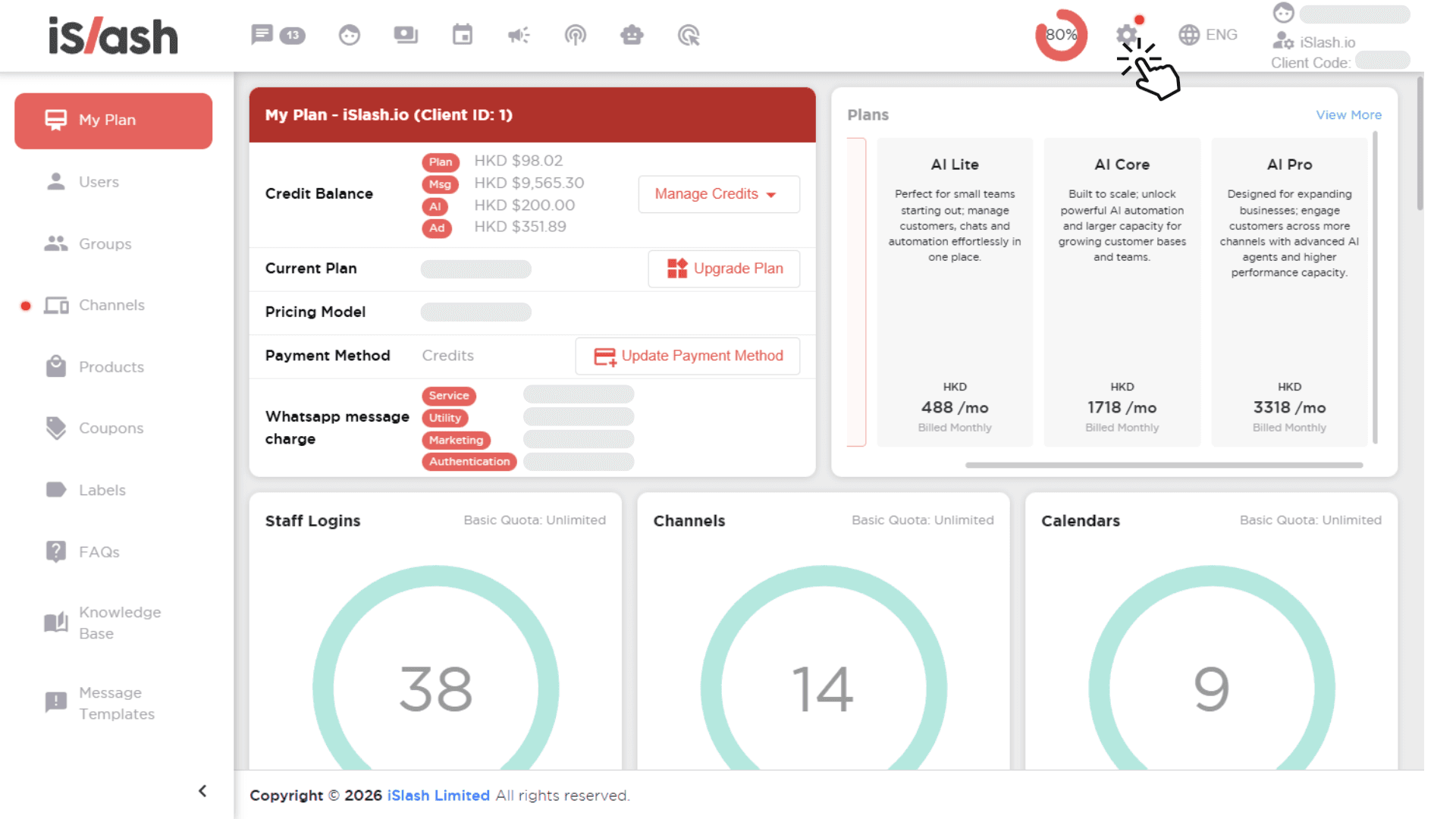
The Settings interface acts as the control hub of your iSlash AI workspace. At a glance, users can understand:
Their current subscription plan
Credit balances and usage
Connected channels and system capacity
Team access and resource limits (users, channels, calendars, and more)
Plan & Credit Overview
At the top of the interface, users can easily review their plan and credit balances, broken down by usage type:
Plan credits
Message credits
AI credits
Ad-related credits
This separation matters. It allows businesses to:
Track where costs are coming from
Manage budgets more accurately
Avoid surprises from mixed usage pools
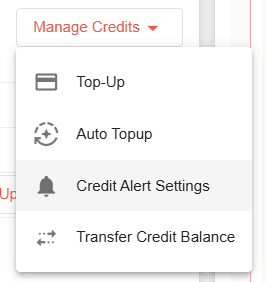
Manage Credits: Full Control Over Usage & Spend
Under Manage Credits, users can actively manage how credits are funded, monitored, and shared.
Top-Up Credits
Users can manually top up credits at any time to ensure uninterrupted operations, especially during campaigns, peak sales periods, or high-volume support days.
Auto Top-Up
To avoid service disruptions, Auto Top-Up allows businesses to:
Automatically replenish credits when they drop below a defined threshold
Maintain system continuity without manual intervention
This is ideal for teams running always-on automations or high-traffic WhatsApp channels.
Credit Alert Settings
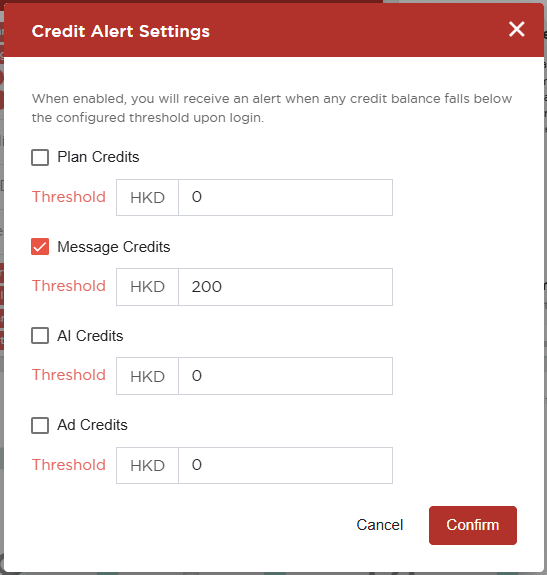
With credit alerts, users can set notifications based on balance levels. This ensures:
Finance and operations teams are notified early
No unexpected pauses in messaging or AI usage
Better coordination between marketing, sales, and support teams
Transfer Credit Balance
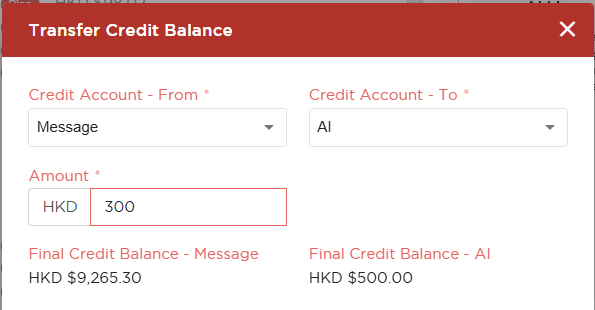
This enables:
Flexible internal allocation of credits between Plan, Message, AI And Meta Ads.
Efficient redistribution based on real usage needs
Chat History Report
Data Name | Description | Remarks |
|---|---|---|
ID | System ID | - |
Channel | Social Media Messaging Channel | WhatsApp, Facebook Messenger, Instagram DM, WeChat |
Contact Name | Customer Display Name | - |
Contact Number | Customer Phone Number | Can be the ID of Channels if no phone number is provided |
User | Platform user, who has defined access to the platform functions. | - |
Direction | Message Direction | Inbound/ System/ Outbound |
Status | Message Status | Read/Received |
Body | Message Content | - |
Media | Message Media Reference | - |
Message At | The Related Message Timestamp | Format: 2024-06-08 10:01:53 |
Sent At | For Chatbot Auto Message | - |
Delivered At | For Chatbot Auto Message | - |
Read At | Agent Read Message Timestamp | - |
Read By | Read By Agents | - |
Template Message | Message Type of WhatsApp Message Templates | Yes/No |
Auto Message | Message Sent by Chatbot | - |
Engagement Report
Table | Description | Remarks |
|---|---|---|
Staff Name | Agent's Name | - |
Staff Email | Agent's Email | - |
Date | Report Date | It can be multiple, depends on the report range |
Total | Inbound: Not counting total message. Eg: Customer send 2 messages at 9.01 and 9.12 > count 1 message | - |
Total (Unique Chat) | Inbound: Total touch agent by phone number. | Engagement: In a given date range, if a customer interacts multiple times with the agent in the chatroom, count it as one engagement. |
Account Report
Table | Description | Example |
|---|---|---|
Total Handle Customer | Total number of customers who have responded to messages. | - |
Total Assigned To | The count of assignments between agents | Agent A: Assign Chat to Agent B and Agent C |
Total Assigned Case | The number of users assigned, excluding those assigned by system | Not included in the number uploaded by excel import. |
Total Close Case | Number of Close Cases | A chatroom can have multiple cases. |
Average Response Time | Reply Message + Average Time of Assigned To Agent (In Ticket Open Status) | Chat 1: Chat 2: 0900 [Customer] "Hi, I would like to request a refund" 0905 [CS] - Assign to After-Sales Service |
Average Handle Time | Average Response Time (In Ticket Open Status) | Situation 1: Calculation: [(0910-0900) + {0912-0911)] /2 Situation 2: 👦 Hi there (0900) 👦 I would like to inquire about the discounts are available now. (0911) Calculation: [(0912-0900) + (0912-0911)] /2 **Calculate in Seconds |
Average Close Time | Calculate the average time from opening to closing for a case. | 0900 Case Open > Chat Message > 1000 Case Closed & 1300 Case Open > Chat Message > 1600 Case Closed Calculation: [(1000-0900) + (1600-1300)] /2 **Calculate in Seconds |
Insights


