WhatsApp Flow
Let customers complete tasks without ever leaving WhatsApp

Conversational Marketing Tool - Convert right within the Conversations: Submit enquiries, Fill up service forms, Book appointments, Request quotation, Update personal details, and more.
WhatsApp Marketing Playbook 2026
WhatsApp In-App Form
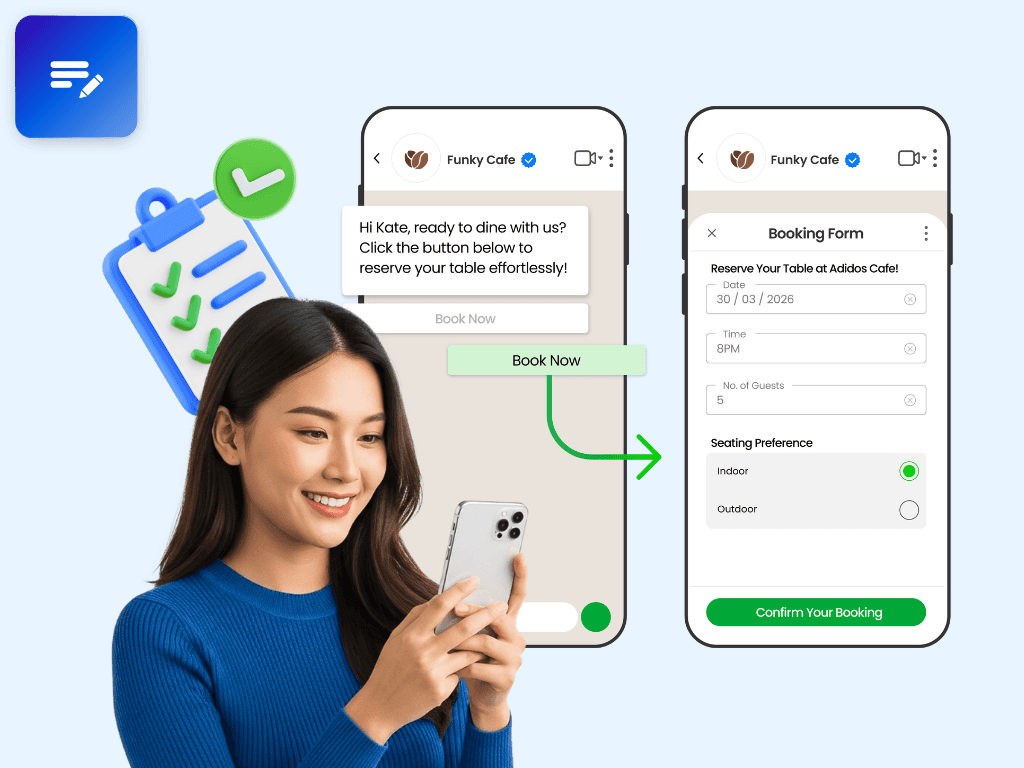
WhatsApp Flows or as being referred to in iSlash AI Platform, WhatsApp Form, is a WhatsApp Business API feature, that enable businesses to send form within a WhatsApp conversation.
From lead generation to feedback collection and more, WhatsApp In-App Form offers endless possibilities for enhancing engagement and gathering insights.
Setup Requirements
Completed WhatsApp Business API Integration
Completed Business Verification
Maintain a high message quality
Attract and Win Customers with WhatsApp Flows
Create seamless and customized experiences optimized for WhatsApp
Attracting and retaining customers is essential for sustainable growth. WhatsApp Flows is like having a magic wand for your business chats. It lets you create forms and interactive steps right in your WhatsApp conversations, making everything super smooth and easy.
You know how businesses are always looking for ways to make things simpler and faster? Well, WhatsApp Flows does just that. By letting you handle customer inquiries, bookings, and payments all within WhatsApp, it's like having a supercharged customer service team right in your pocket.
WhatsApp Flows enables business to drive better performance by creating more seamless and customized experiences - optimized for WhatsApp.

Benefits of WhatsApp Flows, Made Simple

1. Streamlined Customer Interactions
WhatsApp Flows make chatting with customers a breeze. From answering questions to booking appointments, everything happens right in the chat. It's like having a smooth conversation with your favourite chat buddy, but with all the business stuff handled seamlessly.
2. Happy Customers, Happy You
With WhatsApp Flows, you can give your customers a top-notch experience. No more jumping through hoops or waiting on hold—just quick and easy interactions that leave everyone smiling. It's like turning customer service into a piece of cake!
3. Deals and Rewards, Right in Your Chat
Get ready to wow your customers with exclusive deals and rewards sent straight to their WhatsApp. It's like slipping a surprise gift into their pocket, making them feel special and coming back for more.
4. Feedback Made Easy
Gathering feedback has never been simpler. With WhatsApp Flows, you can ask for thoughts and opinions after every chat, helping you improve and grow. It's like having a built-in feedback button that everyone loves to push.
5. Bookings in a Snap
Need to schedule an appointment or make a reservation? With WhatsApp Flows, it's as easy as sending a message. Your customers can book appointments and make reservations directly within the chat, saving time and hassle for both parties.
Use Case Library
Let’s explore a few example use cases for WhatsApp Flows 🔽
1. Flow with Marketing Messages

Flow with Marketing Message #1

Flow with Marketing Message #2

Flow with Marketing Message #3
2. Flow with Utility Messages

Flow with Utility Message #1

Flow with Utility Message #2

Flow with Utility Message #3
3. Flow with Service Messages

Flow with Service Message #1

Flow with Service Message #2

Flow with Service Message #3
WhatsApp Flows - Playground
You can easily set up and preview a basic Flow using this page. WhatsApp Flows leverage these screens, contents to guide users through interactions seamlessly, providing a user-friendly and engaging experience that drives engagement and conversions.
1. Screens
When using Playground JSON to create a WhatsApp Flow, the concept of "screens" are like different steps users go through. Each step is where users do something, like type information or follow instructions.
2. Content
In Playground JSON for WhatsApp Flows, the "content" refers to the information displayed to users at each step of the flow. It includes text messages, media, selection, and any other visual or interactive elements presented to the user.